
Quick Start
For your first moments with
InkJoy Frame.
InkJoy Frameis a color e-paper frame designed for warm, lived-in home spaces. Follow the three steps below to get set up and send your first photo.
Three quick steps
1. Download the APP and sign in
Download and install the InkJoy Frame APP, then complete sign-up and sign-in.


如果你在中国大陆区使用,请点击这里。
2. Complete network setup and binding
Press and hold the device button for about 3 seconds. When the green light appears and the screen refreshes to the setup page, InkJoy Frame is in setup mode.
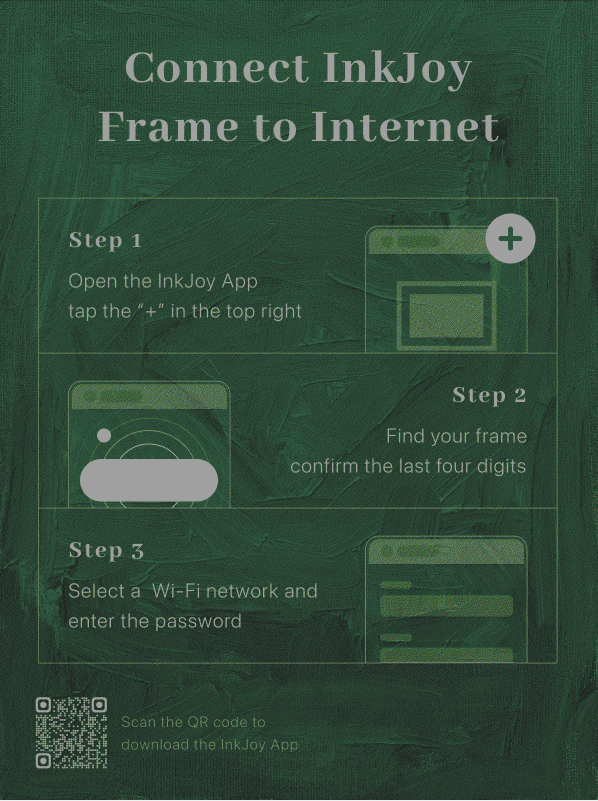
Then open the APP, tap the + icon in the top-right corner, scan the nearby frame, confirm the device number, enter the Wi-Fi information, and give the frame a name.
Detailed guide: Network Setup and Binding
3. Send your first photo
In the APP, choose a photo you like, adjust the preview, and send it to the frame.
Detailed guide: Send Your First Photo
TIP
E-ink does not clear when powered off; rely on the indicator lights to confirm power state. For details, see Power Off and Reset and Indicator Lights.
Troubleshooting
If you ran into issues during network setup, see:
After the first setup
Once your first photo is on the frame, you can continue with the features below:
- Explore to browse official curated content and ready-to-display images.
- Personal Gallery to manage your own photos and saved content.
- Gallery Slideshow to make the frame rotate content automatically.