
Power Off and Reset
This page explains the normal shutdown flow for
InkJoy Frameand how to restore factory settings.
Power off
- Press and hold the power button for about 3 seconds.
- The red light flashes quickly twice.
- The device starts shutting down.
After shutdown, the last image shown before power-off remains on the screen, so you should not rely on the screen alone to decide whether the frame is off.
Use the Indicator Lights page as the main reference: after shutdown succeeds, the red light flashes quickly twice.
Reset
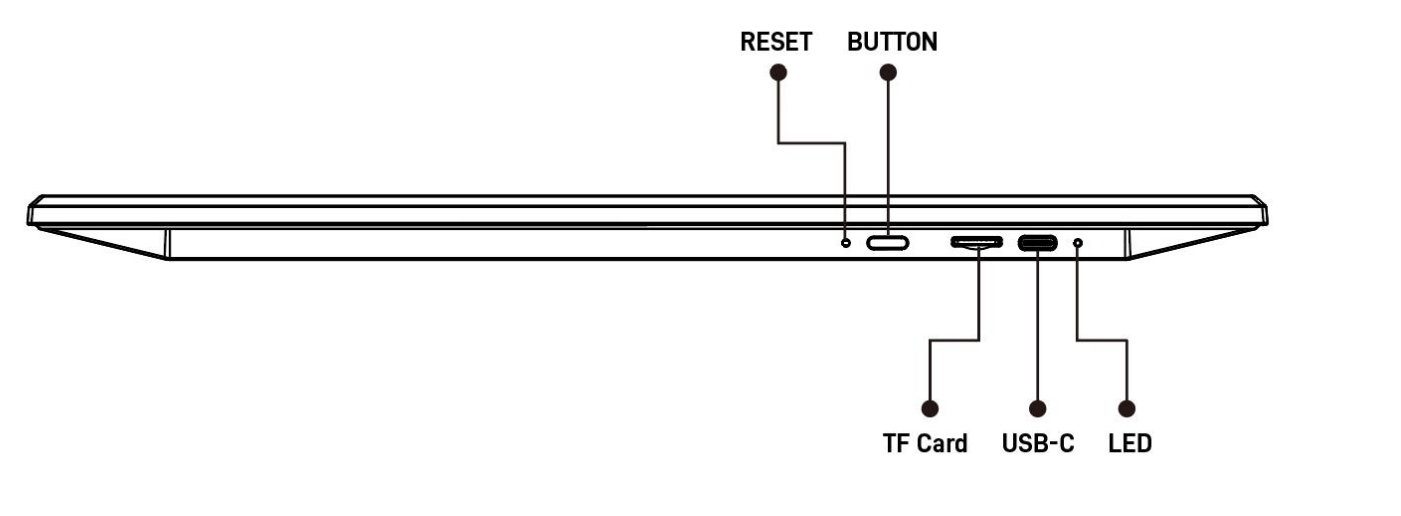
- Find the
RESEThole next to the power button. - Use a pin (or similar thin tool) to press the button inside the hole once.
- The indicator lights start flashing red, blue, green, and other states.
- The device starts restoring factory settings.
After reset
- The frame returns to the initial page.
- The device powers off automatically.
- If you plan to hand it to someone else, unbind the device in the
APPas well.
WARNING
Confirm that you no longer need the current binding and usage data before doing a factory reset.